
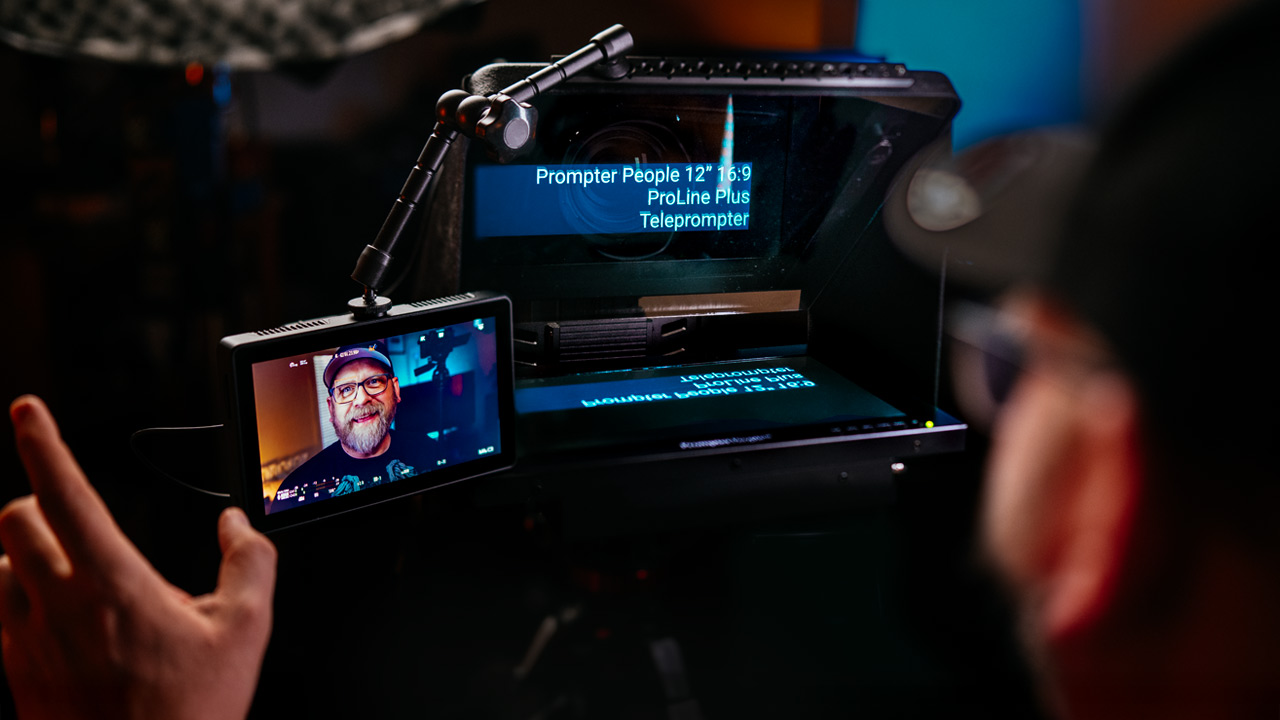
Teleprompter, or more commonly known as an autocue, is a device that lets you look straight into the lens of the camera while delivering, performing, a pre-written script. They’ve been used in television studios for decades, and in the last 10 years or so they’ve also become much more affordable and accessible to creators like us.
There are a lot of different types out there. From small and very cheap ones you use with your phone, to bigger, sturdier and more feature-packed professional ones like the one I’m talking about in this video.
I’ve tried many teleprompters over the years and most of them are… OK. They do the job. But even though I have a lot of experience reading from a scrolling autocue, I often use them with my clients when I film them, and that’s where things get interesting. Because for most people, using a teleprompter well is actually quite hard to learn in just a few minutes.
And that’s exactly where this one is different.
I also care about how the whole setup looks and works on set. I don’t want a flimsy autocue with a phone or tablet hanging off it when I’m doing client work. I needed something more solid, more professional.That’s when I discovered Prompter People a few years ago, and since then I haven’t used any other teleprompters.
This is a perfect example of what a professional teleprompter should be. So keep watching and I’ll show you what it is and what it does and what makes it more special..
Just for the disclaimer, I had this prompter sent to me by Prompter People not only to make a review of it but actually to use in my day-to-day filming projects. I do not have to return it, but there was no money exchanged, involved and I didn’t have to show this video to them before publishing it here. Everything you see and hear in this video is my own opinion about this device.
So what we have here is the Prompter People 12” 16:9 screen ProLine Plus prompter.
It comes in a variety of options and configurations. The 12” version is more than big enough for me. I can use it with 50mm or even 85mm lenses and still be able to read from it clearly.
There are also 15” and 18” versions if that’s what you need.
There are also two different options for screen brightness. The one I have here is designed for indoor use with 400 nits of brightness, or you can get the 1000-nit bright screen version for use outside or under very bright lights, like in a studio.
There are plenty of connection options here as well. BNC, SDI in and out, VGA and HDMI are all included.
What’s special about this monitor is that it automatically flips the image, so when it’s reflected in the mirror the text shows up the right way round.
That means you don’t have to flip the image on the device you are connecting to it, which is actually a big deal. I’ll explain why in just a second.
It’s really well designed and nicely built. At the back there is an attachable sled which holds the camera, and you get two of these riser boxes for different camera sizes.
The hood contains a cloth section at the back with a drawstring that goes around the lens and blocks any stray light from coming through.
The mirror itself is protected by the hard hood. At the front, on top of the hood, there is a bar with a bunch of standard threaded holes for attaching accessories like microphones or monitors, just like I am doing right now. This bar is also standard NATO rail size, which is very useful.
The whole thing is very easy to assemble and set up. You really don’t need instructions.
You can also purchase an optional bag or hard case that fits everything assembled like this.
All great, but without the software this is just a monitor. As standard it comes with Prompter People’s TeleScroll software. So you run the software on your computer, connect it to this monitor and you are ready to go.
The standard TeleScroll is great and easy to use. You input your text, set the font size and start prompting. Once the text is scrolling you can change the scroll speed as well. This works well if you already have some experience using a teleprompter. But if you make mistakes or add something while speaking, you have to rewind the text back.
You can do that using Prompter People’s shuttle controller or just the keyboard.
That why image flipping on the prompter monitor is important because if someone is operating it for you, the prompter, they see the text the right way round on the computer screen, because the prompter’s monitor flips the image, not the software on the computer.But there is another solution. Yes, you have to pay extra for it, but it is a game changer.TeleScroll Voice. Let me show you how it works.
From the backend it works exactly the same as the standard TeleScroll. The difference is when you are reading from it. It uses your computer’s microphone to listen to you and only scrolls to the next sentence when you read one out.
This allows you to speak much more comfortably and at your own speed,
And if I add something that’s not in the script… it’s not written, it’s not on the screen in front of me. The prompter will just pause and wait for me, and then continue scrolling when I start reading again.
It’s also a game changer when I use it with clients who have never used a teleprompter before. It just feels right and most of the time we get it in one take. Anyone can master it in seconds.Right now it supports only English, French and Spanish but there will be more languages added in the future.
OK, so it’s not the cheapest teleprompter you can buy but possibly the best one you can buy.
There are several options to customise it to your needs which will affect the price of the whole package. This 12” kit with a 400-nit monitor, sled and standard software will set you back $2099, or $2299 with TeleScroll Voice software. $200 more will get you the 1000-nit bright monitor version.
The good news is that Prompter People now has a number of European distributors as well. I’ll put the link to the full list on their website in the description below.
Expensive if you think of buying one on a whim. But if you want a teleprompter that feels like a proper piece of production gear rather than a lightweight accessory, this is exactly that.Yes, cheaper options exist and they will display your script just fine. What you’re paying for here is the build quality, the stability and the fact that it integrates properly with real camera or studio setups.
And if you add TeleScroll Voice into the mix, the whole thing becomes even more powerful. Being able to control the scroll with your voice means you can just speak naturally and the script follows you, not you the script.
And that’s when something like this stops being just another gadget and becomes a real tool for the job and I couldn’t do mine without it. Highly recommended.
Recent Comments